最初のファイルが同期されるまで
macOS 13以降のMacと、読み書き権限を持つCloudflare R2またはS3互換ストレージを用意してください。アプリは買い切りで、保存・操作料金はストレージ事業者に別途支払います。購入前にApp Storeの現在の価格と対応環境を確認できます。
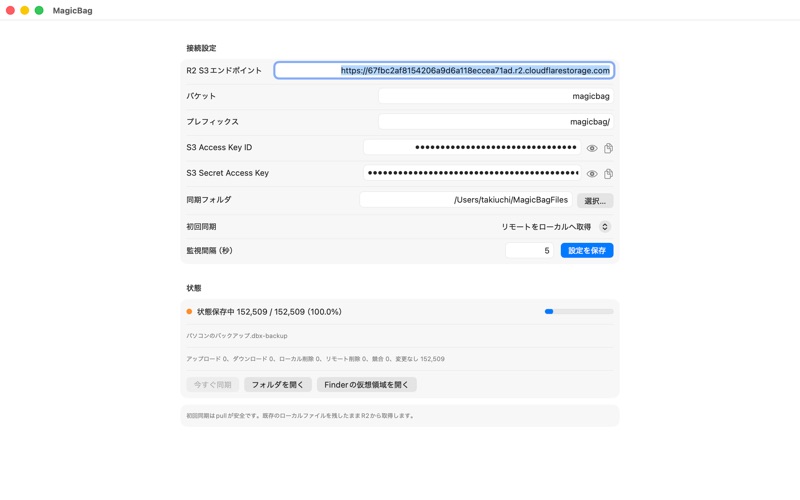
- 保存先を準備。R2のバケットと対象を限定した読み書きキーを作成します。初回は空の専用バケットまたは専用prefixを使います。
- アプリに入力。Endpoint、バケット、prefix、キーをMagicBagの設定画面に入力します。R2の署名リージョンはautoです。ローカル同期フォルダも空の専用フォルダを選び、初回同期は「リモートをローカルへ取得」を選択して設定を保存します。Webサイトにはキーを入力しません。
- 小さなファイルで確認。設定保存が成功したら「Finderの仮想領域を開く」を押し、新しいテキストファイルを1つコピーします。同期状態を確認し、R2の同じprefix内にデータが作られたこと、Finderからそのファイルが開けることを確認します。
- 使い始める。最初のファイルを確認してから、必要なファイルを少しずつコピーします。空フォルダのみの同期には対応していません。同期先の削除も反映されるため、同期とは別にバックアップを用意してください。
途中で止まったら
接続に失敗したら、バケット名、キーの権限、Endpoint、署名リージョンをエラー別の案内で確認してください。Finderが開かない場合は設定保存の成功を確認して再度開きます。
サポートへ:macOS・アプリのバージョン、止まった手順、エラーメッセージを添えてください。Access Key ID・Secret Access Keyは送らず、画面を共有する場合も伏せてください。
Your first synced file
You need a Mac running macOS 13 or later and your own Cloudflare R2 or S3-compatible storage with read/write access. MagicBag is a one-time app purchase; storage and operation charges are separate. Check the App Store for current regional pricing and requirements.
- Create a dedicated empty bucket or prefix and a bucket-scoped read/write key. Follow the R2 manual, which includes a language selector.
- Enter the endpoint, bucket, prefix and credentials in the app, choose an empty local sync folder, select the initial mode that downloads remote files to the local folder, and save. For R2 use signing region auto. Never enter credentials on this website.
- After saving succeeds, choose “Open Finder location”, copy one small text file, check the sync status and the objects in your chosen storage prefix, and open the file from Finder.
- Copy more files gradually. Empty directories are not synced. Deletions also sync; keep a separate backup.
The image above is the actual App Store screenshot checked on October 1, 2026; its values and file counts are examples. For help, use the troubleshooting guide or contact support with your OS/app version, failed step and error message. Do not include access keys.